
Building hybrid AI setups
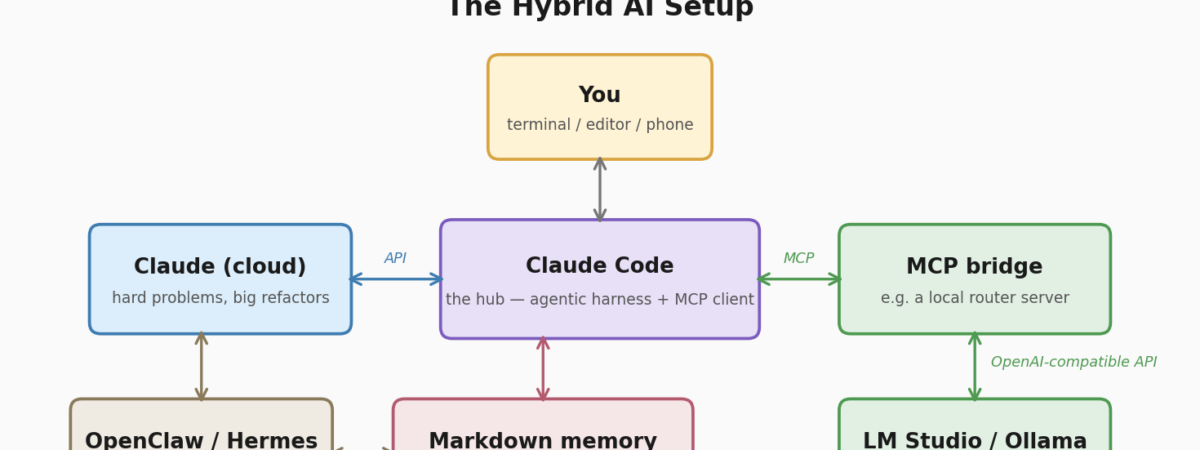
Continuing my accidental “an idiot explores AI” series, today I’m looking at pairing a cloud frontier model with a local LLM for reasons that are mostly financial. I’ve been using Claude for a while now, like many people, but it eats tokens if you’re not careful. So, I wondered if it would play nicely with a smaller, local model running alongside it.
This started as an experiment in not burning through tokens on tasks like “write me a regex” and has slowly turned into the way I work by default. It has it’s drawbacks, but in general it works quite nicely. Having been running like this for about three months now, and having tested a fair few configs, laptops / desktops and even operating systems, I thought it would be nice to share.
So, this post is part explainer, part tutorial: what this hybrid setup actually looks like, what hardware can run what, and how to wire it all together — whether you’re on an old laptop or something with frankly indecent amounts of unified memory.
Why hybrid at all?
The cloud frontier models (Claude, GPT, Gemini) are pretty good, get better every week, and nothing you run at home will match them on the hard stuff. But they cost money per token, every prompt takes a round trip across the internet, and everything you send leaves your machine. Local models fix all of that; free once you own the hardware, instant, and private. The catch is that they’re nowhere near as smart, bordering on actual stupidity – sometimes a little, sometimes a lot, depending on what you can fit in memory.
The trick, then, isn’t choosing one. It’s routing. Send the architecture decisions, the horrible multi-file refactors and the “why is this on fire” questions to Claude. Send the commit messages, the boilerplate, the log summaries and the “what does this error mean” questions to the thing sitting on your desk. Done well, the local model quietly absorbs 50–70% of your day-to-day prompts, and your cloud usage gets reserved for the work that actually needs it.
There’s also a less obvious benefit: anything sensitive: credentials-adjacent config, client code you’d rather not ship to anyone’s API, that sort of thing, can stay entirely on your own machine. As someone who spends a fair amount of time thinking about AI security, I like that a lot.
Step one: what will your hardware actually run?
This is the question that decides everything else, so let’s get it out of the way. The rule of thumb: a model quantised to Q4 (4-bit, the standard “good enough” compression) needs roughly 0.6GB of memory per billion parameters, plus headroom for context. So a 9B model wants ~6GB, a 27B wants ~17GB, and so on.
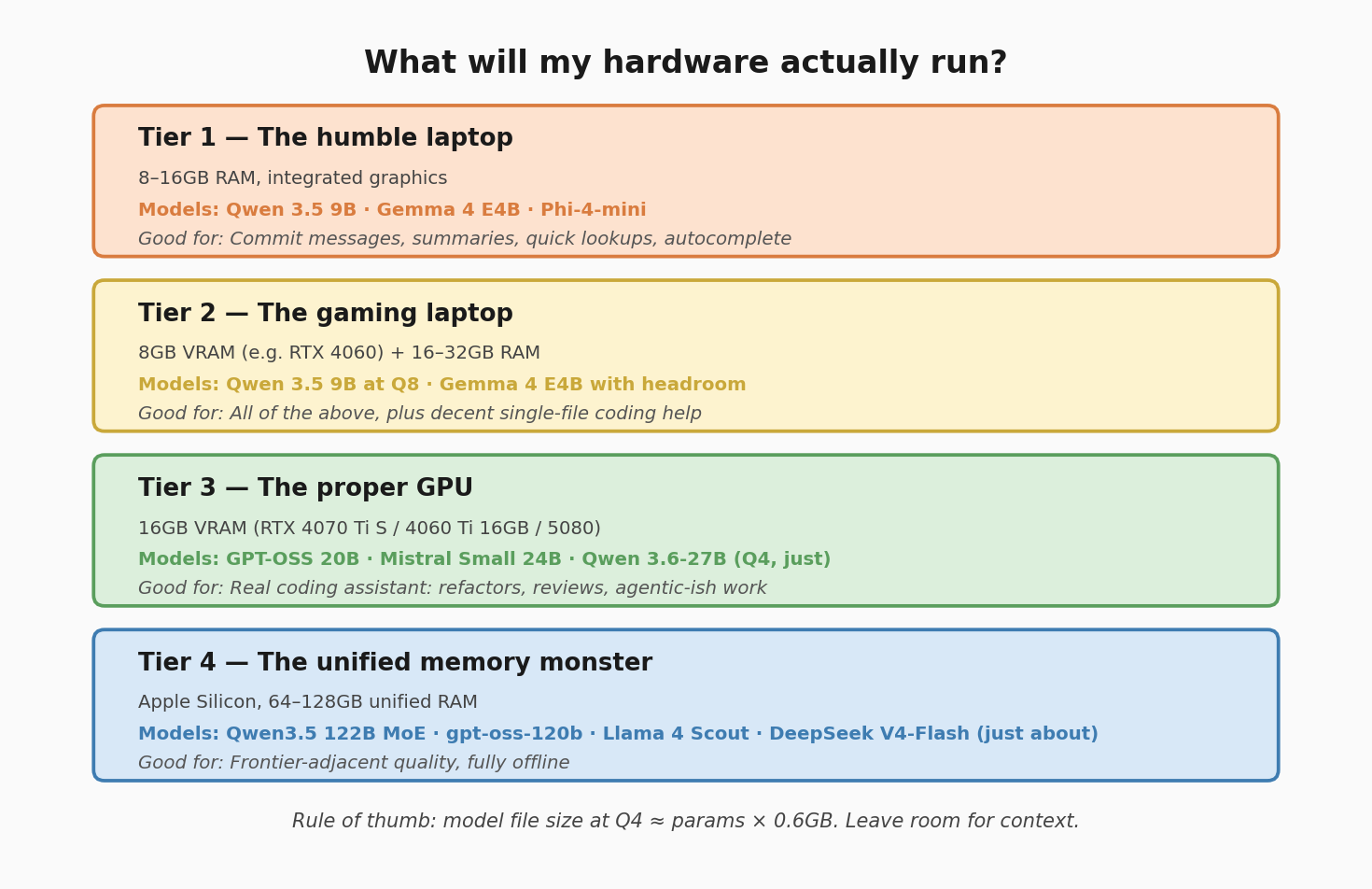
(As you can probably tell, I roped in Claude and his mate Qwen to make me some images for this)
Tier 1: the humble laptop (8–16GB RAM, aging Intel CPU & iGPU)
Initially, I didn’t think this would work at all. But, I was quite surprised. Models in the 4–9B range have gotten shockingly good. Qwen 3.5 9B fits in under 7GB and outperforms models several times its size from a year or two ago; Google’s Gemma 4 E4B squeezes into 6–7GB and even handles images. You’re not getting a pair programmer here, but for summarising, drafting, commit messages, quick factual lookups and editor autocomplete, a tiny model running on a potato is genuinely useful — and it works on the train with no signal. But look, don’t expect lightening fast performance. It’s sluggish, but that doesn’t mean it’s useless.
Tier 2: the workstation / gaming laptop (8GB VRAM)
This is my laptop — an RTX 4060 with 8GB VRAM and 32GB RAM. Same model class as Tier 1, but you can run the higher-quality quantisations (Q8 instead of Q4) at proper interactive speeds, keep longer context loaded, and get decent single-file coding help. Perfectly serviceable as a sidekick. I use this a lot for planning and scoping out big projects.
Tier 3: the proper GPU (16GB VRAM)
Now we’re talking. With 16GB (an RTX 4070 Ti Super, a 4060 Ti 16GB, or a 50-series card) you can run OpenAI’s gpt-oss-20B — a mixture-of-experts model that fits in under 14GB and absolutely flies — or Mistral Small 24B, or Qwen’s 27B coder-class models at Q4 if you’re willing to offload a layer or two to system RAM. This is the tier where the local model stops being helpful, and becomes a legitimate coding assistant: refactors, code review, test generation, the lot. It’s what I run on my desktop (a 5080 with 64GB system RAM), with a Qwen coder model loaded in LM Studio.
Tier 4: the unified memory option (Apple Silicon, 64–128GB)
I hate to admit it, but Macs have a bit of an edge here. Because Apple Silicon shares one big pool of memory between CPU and GPU, a Mac with 128GB of unified RAM can load models that would need thousands of pounds of stacked NVIDIA cards on the PC side. On a 128GB M-series machine (an M4 Max Studio today, or the new M5 Max MacBook Pros) you can run the genuinely big open-weight stuff: Qwen’s 122B mixture-of-experts at 40+ tokens per second, gpt-oss-120b, Llama 4 Scout, and — with aggressive quantisation — even DeepSeek’s V4-Flash just about squeezes in. If you were hoping to run Gemini at home, the closest you’ll get is Gemma, Google’s open-weight family, which runs beautifully on this class of hardware. It’s about as close to the frontier models as you can get without remortgaging.
AMD also offer the “Strix Halo” class SOC’s (Ryzen AI Max 395, for example), which also use unified memory. I haven’t tested this myself, but it looks genuinely good – although there seems to be mixed opinions on the stability / usability of the AMD libraries for running LLM’s.
A quick word on mixture-of-experts (MoE), while we’re here: these models only activate a small slice of their parameters per token — DeepSeek V4-Flash is 284B parameters on disk but only 13B “fire” at once. The result is big-model quality at small-model speed, which is exactly the trade unified memory machines (and patient GPU owners) want.
Step two: pick a runtime
You need something to actually serve the model. The realistic options:
LM Studio — what I use, because I’m a survivor of the DOS / Amiga CLI era, and would like to slap a GUI on everything. A friendly desktop app: browse models, click download, click load, done. Crucially, it exposes an OpenAI-compatible API server on localhost, which is what makes all the integration below possible.
Ollama — the CLI-first equivalent. ollama run qwen3.5 and you’re off. Also serves an API. Great if you want the model running as a background service you never think about.
llama.cpp — the engine both of the above are built on. Go direct if you want maximum control and minimum overhead, and don’t mind compiling things.
On Apple Silicon there’s also MLX, Apple’s own framework, which is usually the fastest option on a Mac. LM Studio supports MLX models natively, so you mostly get this for free.
Whichever you choose, the final form is almost identical: a local HTTP endpoint (typically http://localhost:1234/v1 or :11434) that speaks the OpenAI API format. Everything else plugs into that.
Step three: wire it into your workflow
Here’s where most people stop. They end up with Claude in one window and a local chat UI in another, copy-pasting between the two like an animal. The goal is one workflow where both models are on tap.
My hub is Claude Code, Anthropic’s terminal-based agent. Two features make it the right centre of gravity for a hybrid setup: it supports MCP (Model Context Protocol, an open standard for plugging tools into AI agents), and it reads markdown memory files (CLAUDE.md) for project context.
The MCP bit is the magic. You write (or grab – there are plenty on Github, but it’s easy to write your own) a small MCP server that wraps your local model’s API, register it with Claude Code, and suddenly Claude can delegate to your local model as a tool. I went down the build-it-myself route with a little TypeScript/Express router I call RosettaMCP that sits between Claude Code and LM Studio. Once you’ve chosen / built your MCP server, registering one is a single command:
claude mcp add local-llm -- node /path/to/your/mcp-server.js
Once it’s in, you can do things like:
> Use the local model to summarise everything in /logs from today, then review its summary and flag anything that looks like a real incident.
That’s the hybrid pattern in one prompt: cheap local pass over a mountain of text, expensive cloud judgement over the distilled result. Claude orchestrates; the local model does the grunt work.
A few other integration routes worth knowing:
Editor extensions — Continue (VS Code/JetBrains) lets you assign different models to different roles: local model for tab-autocomplete, Claude for chat and edits. This is probably the lowest-friction hybrid setup going if you live in an IDE.
Aider — a terminal pair-programmer that can switch models per session or even per task, including “architect mode” where a strong model plans and a cheaper model types.
Shared memory — whatever you use, keep project context in plain markdown files in the repo. CLAUDE.md for Claude Code, and the same notes fed to the local model via your MCP bridge. Markdown is the one context format every model understands, and it means you can switch brains mid-project without re-explaining everything. Unglamorous, yes. But, absolutely essential.
The division of labour
So what actually goes where? After months of fiddling, my routing table looks like this:
Local model gets: commit messages, boilerplate and scaffolding, log/diff summarisation, regex and one-liners, doc comments, quick “explain this error” questions, anything containing data I’d rather keep at home, and anything I want to do offline.
Claude gets: architecture and design decisions, multi-file refactors, debugging anything genuinely confusing, security review (do not trust a 9B model to spot your security vulnerabilities, please), agentic tasks that touch many tools, and any writing I actually care about (although GPT-OSS is pretty good with that, to be fair).
The fallback approach: if getting it wrong costs you more than a few minutes, send it to Claude. The local model’s job is to make the cheap stuff free, not to replace the expensive stuff badly.
Putting it all together: the “ultimate” setup
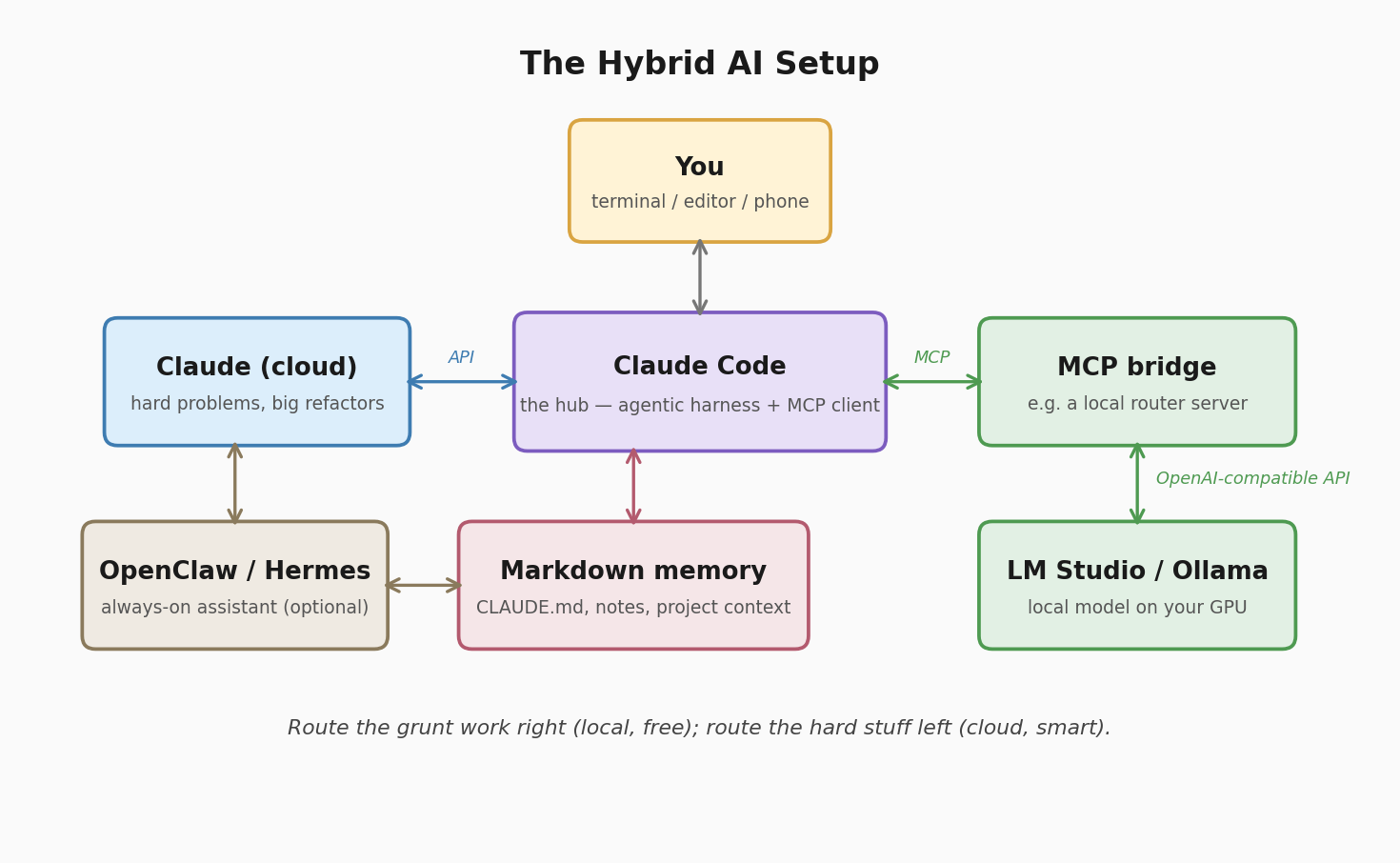
The full stack, top to bottom:
A GPU box (or big-memory Mac) running LM Studio or Ollama as a background service, model picked for your tier. Claude Code as the day-to-day harness, with an MCP bridge registered so it can delegate down to the local model. Continue in the editor with the local model on autocomplete duty. Markdown memory files in every project so both brains share context. And the discipline (this is the hard part) to actually route tasks instead of lazily sending everything to the smartest model (that bit took a while, honestly).
One practical tip from my own setup: make it easy to flip on and off. My local model shares a GPU with my games, so the whole local stack runs as a service I can stop in one click when it’s time for shooting things. A setup you have to babysit is a setup you’ll abandon.
Beyond code: the always-on assistant layer
Everything above is developer-flavoured, but the same hybrid idea has escaped the terminal. The big story of early 2026 has been self-hosted personal assistant agents. Now, I haven’t directly played around with these too much, but I have been reading up on them and am thinking about pulling the trigger on something soon.
OpenClaw (Peter Steinberger’s project, and one of the fastest-growing open-source repos ever) is a gateway that runs on your own machine and connects AI agents to the chat apps you already use — WhatsApp, Telegram, Discord, Slack, iMessage, about two dozen channels. The result is a 24/7 assistant you message like a person: it manages your calendar, drives a browser, runs scheduled jobs, remembers context between conversations. It’s model-agnostic, so the brain can be Claude, or a local model, or a mix.
Hermes Agent (from Nous Research, released February 2026, MIT licensed) takes a different bet: instead of breadth of integrations, it focuses on learning. It builds persistent memory and reusable “skills” from experience, so the agent measurably improves at your recurring tasks over weeks of use. Same chat-channel interface (Telegram, Discord, Slack, WhatsApp), one-line installer, and again — happily runs on local models, which makes a Tier 3/4 box a genuinely free always-on assistant.
Now, the obligatory cold shower, and this is the bit that’s never really made central to the conversation when these things come up: an always-on agent with access to your email, files, browser and messaging apps is a magnificent attack surface. Prompt injection is real – a malicious email or web page can contain instructions your agent may happily follow. If you try either of these, start with locked-down permissions, allow-list who can message it, keep it away from anything that can spend money, and treat every new “skill” like code from a stranger. Because it is. (This is roughly my day job talking, but it bears repeating.)
Used carefully, though, this layer is the logical endpoint of the hybrid idea: cloud intelligence when it matters, local models for the routine, and the whole thing reachable from the messaging app already in your pocket.
Annnd finally
If all of this sounds like a lot, it isn’t, really. The minimum viable version is: install LM Studio, download a model that fits your tier, point Continue or a small MCP bridge at it, and start routing the boring stuff locally. An afternoon, maybe two if you insist on writing your own router like I did. From there it grows incrementally: better models as hardware allows, more integrations as habits form, and eventually, perhaps, a lobster-themed assistant living in your WhatsApp.
As ever, this has been a fairly light pass over a deep topic. I’m hardly an expert, but rather an enthusiastic idiot, stumbling his way through stacks of documentation and accidentally finding things that work well. But, it’s quite cool to work out what works, what doesn’t, and how to get the most out of what you’re working with. In time, I think we’ll see smaller, quant models getting smarter and smarter, MOE models becoming more common and the gap between the frontier models and what you can do locally narrowing.
But, until then, I’ve got an excuse to buy silly graphics cards.
0 Comments